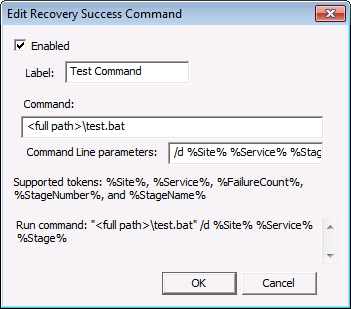
Perform the following steps to add a recovery command to execute after a successful recovery.
To Add a Recovery Success Command
Note: An area at the bottom of the dialog box will show the command and parameters that will run for this command.
| Property | Description |
|---|---|
|
Enabled |
Click to enable the recovery success command. |
|
Label |
Type an appropriate label for the command. |
|
Command |
Type a command to execute after a successful recovery (such as an .exe or .bat). Note: Specify the full path to the .exe or .bat file. |
|
Command line parameters |
Type any required command-line parameters or text tokens. |
|
Supported tokens |
The following text tokens can be appended to the command line, if desired:
|
|
|
|

